


In the world of pay-per-click advertising, a keyword can have different variations. For Google AdWords and Bing Ads, there are five variations, called “match types.” Each one has a specific use that can be leveraged by savvy PPC marketers to improve performance.
Broad Match
This is the default setting for new keywords in most platforms. As its name suggests, it also gives search engines the most latitude when matching your keyword(s) to a specific search query. Both the search query and the keyword can be multiple words. With broad match, your keyword can match a query with the words in any order. It can also match synonyms.
For example, if your keyword were “red shoes,” your ad could appear for multiple search queries, such as “buy red shoes,” “shoes that are red,” “ruby shoes,” and “ruby slippers” — ruby is a shade of red and slippers are a kind of shoe.
Broad match is sometimes too expansive, as in the example above. But it can be good, too. Google reports that as many as 20 percent of monthly searches are unique, meaning it’s the first time the searches have appeared. As an advertiser you don’t want to have to generate 20 percent more keywords each month and hope you guessed right. Broad match can help you catch those new queries. And if you’re interested in a little more control, consider the next match type: modified broad match.
Modified Broad Match
To modify your broad match keywords you simply add the “+” sign in front one or more words. So “red shoes” becomes “+red +shoes.” The benefit is that the modifier tells the search engine your ad should only be eligible if the word marked with a “+” is present.
So now our keyword “+red +shoes” would be eligible for searches like “buy red shoes” and “shoes that are red.” But it would not be eligible for searches like “ruby slippers” or “magenta shoes” or “red Nikes.”
Brad Geddes, a well-known AdWords practitioner, recently said that modified broad match was something that most PPC marketers seem to miss or not know about. But I nearly always recommend using this match type instead of broad match. The only exceptions would be where volume is the main objective. Then you would use many negative keywords, which I’ll address below.
Phrase Match
If the order of keywords in a search query is important for intent, then consider phrase match. For example, if you advertise on “California hotels,” you don’t want to show up for searches on “hotel California.” Phrase match also allows your ad to show when someone adds words before or after, like “best California hotels” or “California hotels near Disneyland.”
To use phrase match, put quotes around your keyword when uploading it into the interface. Note that while I used quotes for broad match above to ensure clarity for this article, use those in the ad interface only when you want to indicate a phrase match.
Exact Match
I’m a control freak about my keywords and campaigns. If you want to indicate to the search engine exactly which words must be present, the exact order they should be in, and that you don’t want to show if the searcher adds something before or after, then exact match is what you want. It is by far the most restrictive match type and will lead to the fewest impressions. However, since your keyword matches the search query exactly — and hopefully matches your ads and landing pages — you would expect to see better performance.
Here is what the four match types look like.
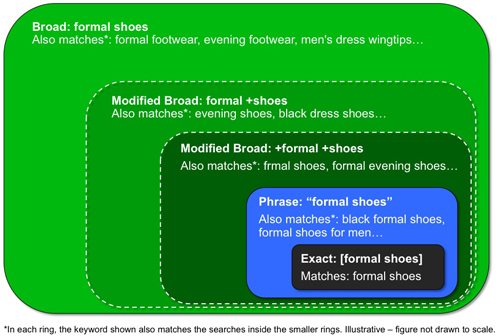
Of the four match types, “broad” is the most expansive and “exact” the least. Source: WebRanking.com.
In September 2014, AdWords introduced close keyword variations, which some have called “exact-ish” match. Here is the explanation from Google.
We’ll show your ads for close variations of your phrase and exact match keywords to maximize your potential to show your ads on relevant searches. Close variations include misspellings, singular and plural forms, acronyms, stems (such as floor and flooring), abbreviations, and accents. So there’s no need to separately add close variations as keywords.
So even if you are using phrase match and exact match, Google is still taking liberty as to when it shows your ads. This brings me to our last keyword type: negative keywords.
Negative Keywords
Negative keywords are phrase and exact match keywords in reverse. With negative keywords, you instruct the search engines what you don’t want to show up. For example, a shoe advertiser using “red shoes” as the keyword could add a negative keyword for “ruby” or “slippers” to keep from showing on “ruby slippers.” She might also want to include “loafers,” “sandals,” “flip flops,” or any other type of shoe that doesn’t match her inventory.
Similarly, a hotel advertiser using “California hotel” as the keyword may want to include negatives like “eagles,” “lyrics,” or “song.” Negative keywords give you additional control to ensure you aren’t spending money on clicks from queries that are irrelevant.
To be sure, keyword research is critical. But making sure you use the correct match types can have as major impact, too, on your final results.



 ChatGPT vs. Gemini for SEO Tasks
 SEO Takeaways from SGE's Partial Rollout
 BNPL Competition Drives Wins for Merchants
 Google Ad Updates Reflect New SERPs
 How to Track ROI from Content Marketing
 Web Marketing Checklist: 42 Tactics for Traffic and...
 The Profitable Seller: Mastering Amazon FBA
